Download Software License Certificate
|
| Quick Instructions for Installation of Software License Certificate |
- Download your software license certificate from this download form, and save it as a file.
- Put your software license certificate into SAI's program folder(Normally the folder is 'C:\PaintToolSAI').
- Restart SAI.
SAI automatically detects a software license certificate from own folder.
More detailed instructions are written in the following sections. Please see them if you need.
|
Notice : For the protection against illegal access, following limitations exist in this downloading page.
- While the downloading count on your license account is exceeding 10 times in the past 24 hours, you cannot download anymore.
- While the downloading count from same IP address is exceeding 30 times in the past 24 hours, you cannot download anymore.
- If the downloading count on your license account exceeded 30 times in the past 31 days, your license account will be frozen.
|
|
The software license certificate is a file that changes PaintTool SAI from trial mode to licensed mode.
Please make sure before installation of this software license certificate you need to complete installation of PaintTool SAI.
Note: If you want to install this software on your own two or more computers, you need to download the software license certificate for each computer with each computer's system ID.
Important Notification:
We cannot provide any support for installation for the fan-made distribution(http://sai.detstwo.com/sai/) because the installer of this distribution is not made by us.
If you want to use this fan-made distribution, and if you got some problems about installation, please contact http://sai.detstwo.com/sai/ .
Step 1: Input your software license number and certificate download password to the download form.
I. Find your software license number and certificate download password in the email titled "[SYSTEMAX] Information about Your Software License".
Dear Customer

Payment Detail
----------------------------------------------------------------------------
Invoice ID     : 0013xxxxxxxxxxxxxx
Product Name   : PaintTool SAI Ver.1 Software License
Unit Price     : 5,250 JPY (include tax)
Quantity       : 1
Total          : 5,250 JPY (include tax)
Payment method : PayPal
----------------------------------------------------------------------------

Thank you for buying "PaintTool SAI Ver.1 Software License".

Your software license information are as follows.
Please preserve this information carefully.

Software License Information
----------------------------------------------------------------------------
 1.      Softoware License Number : 010000123456
    Certificate Download Password : ********
          Password Character Type : --------
----------------------------------------------------------------------------

(*) Meaning of "Password Character Type":
  1 ... Numeral
  A ... Capital letter
  a ... Small letter

You can download your software license certificate file from the following
page. Please download your software license certificate file and copy it
to your SAI's program folder.
https://www.systemax.jp/en/license.html

Thank you.
|
II. Input your software license number and certificate download password to the download form.
We recommend you to input the license number and the password by Copy and Paste operation.
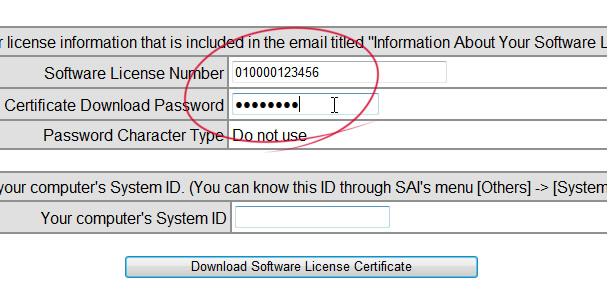
Step 2: Input your computer's System ID to the download form.
I. Launch SAI and show your computer's system ID through menu [Others] -> [System ID].
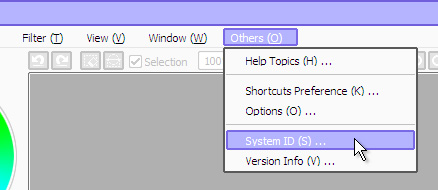
II. Copy or note your computer's system ID.
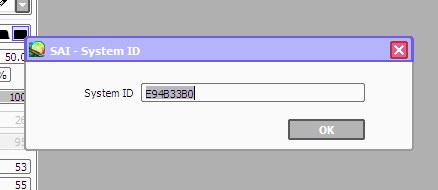 Notice: "E94B33B0" is example. Actual System ID is different on each computer.
III. Paste or input your computer's system ID to the form.
Please make sure to close SAI after this input.
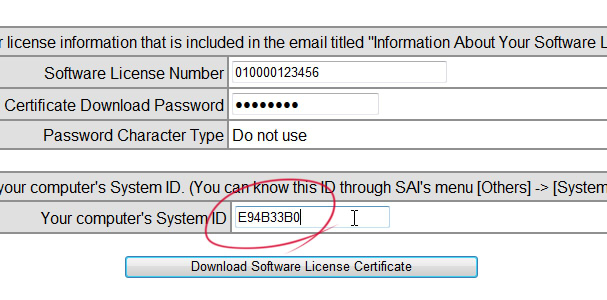
Step 3: Download your software license certificate and save it as a file on your computer.
Notice: These instructions are for Internet Explorer 9 or later.
If you are using other web browser, please do the equivalent operations on that browser.
I. Push "Download Software License Certificate" button on the download form.
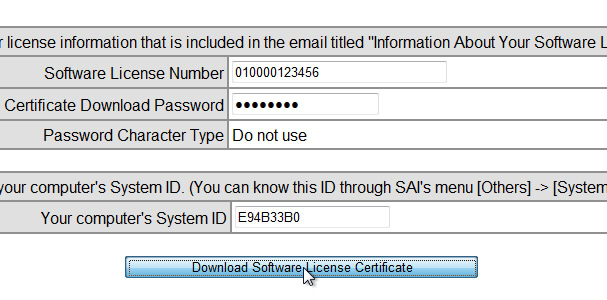
II. Push "Save" button on the downloading options popup displayed on the bottom of web browser.
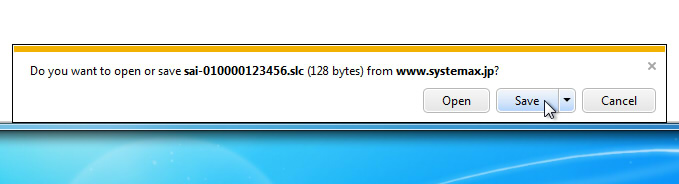 Notice: You NEED NOT OPEN your software license certificate. Please do not push "Open" button.
III. Push "Open Folder" button on the completion notification popup displayed on the bottom of web browser.
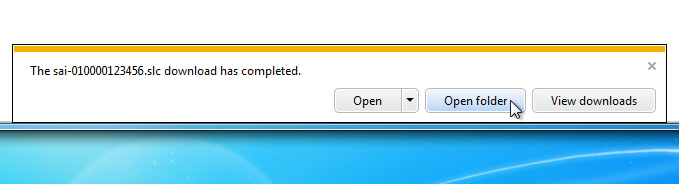 Notice: You NEED NOT OPEN your software license certificate. Please do not push "Open" button.
After the above operations, you will open a folder that Internet Explorer saved your software license certificate.
Please find your license certificate file that name is "sai-YOUR_LICENSE_NUMBER.slc".
Please do not close this folder until installation of the software license certificate is completed.
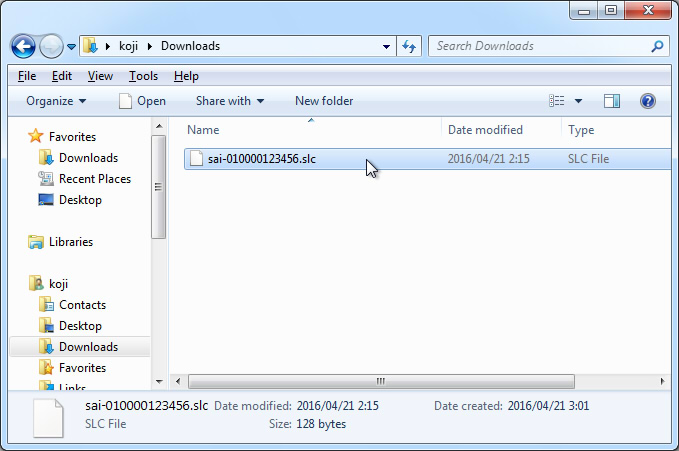 Notice 1:
Normally, your web browser saved the downloaded certificate file into "Downloads" folder when you pushed "Download Software License Certificate" button even if your web browser did not display any download option.
Please open the following folder, and find your license certificate file that name is "sai-YOUR_LICENSE_NUMBER.slc".
Windows Vista or later:
open [Computer] from start menu or Desktop, trace folders 'Favorite' -> 'Downloads'
or
open "C:\Users\(USER NAME)\Downloads"
Windows XP:
open [Computer] from start menu, trace folders 'Desktop' -> 'My Documents' -> 'Downloads'
or
open "C:\Documents and Settings\(USER NAME)\My Documents\Downloads"
Notice 2:
Some web browser add ordinal to the filename of downloaded file if the same filename already exists.
However, SAI cannot recognize a filename of software license certificate that ordinal added by web browser.
Please remove the ordinal if it is added to the filename of your software license certificate.
(e.g. "sai-010000123456 (1).slc" -> "sai-010000123456.slc")
Notice 3:
In default settings of Windows, Windows will hide the extension(".slc") of your software license certificate if you associated SLC file to any program. (In this case, Windows displays your software license certificate as "sai-010000123456" not "sai-010000123456.slc".)
Notice 4:
If you got some of the following problems, please try to use other web browser(e.g. Firefox, Google Chrome) .
- Your Internet Explorer does not display any downloading options, and does not save your software license certificate into "Downloads" folder.
- Your Internet Explorer fails to download of your software license certificate.
Step 4: Open SAI's program folder.
I. Find a shortcut of SAI named "PaintTool SAI Ver.1" on your Desktop.
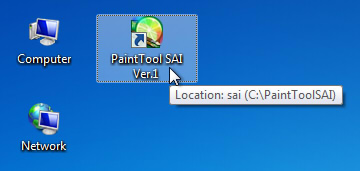
II. Right click the shortcut, and select "Open file location" in shown context menu.
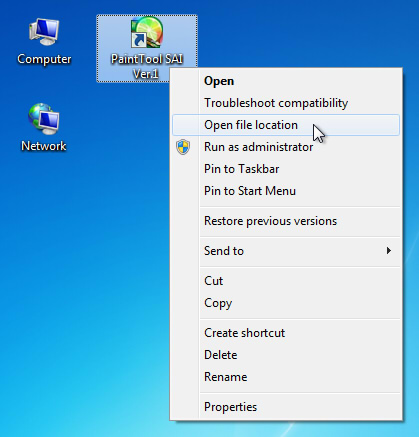 Notice for Windows XP users:
"Open file location" is not existing on the context menu.
To open the folder, open "Properties" of "PaintTool SAI Ver.1" and push "Search Target" button.
After the above operations, you will open SAI's program folder.
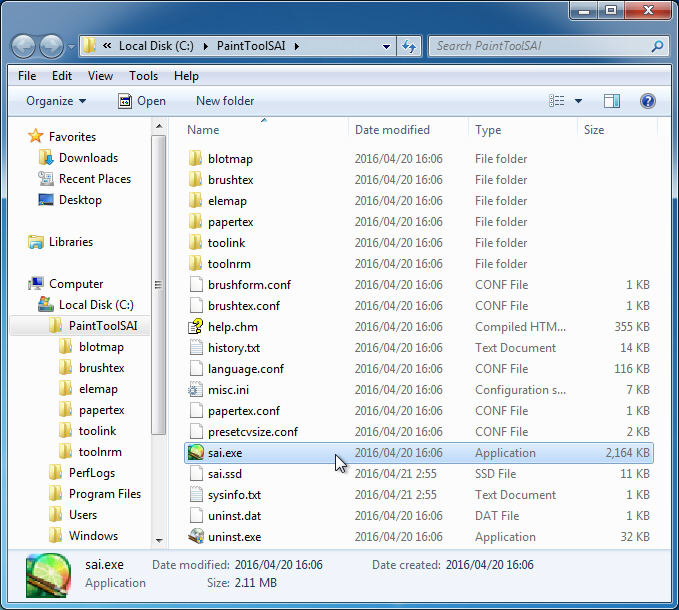
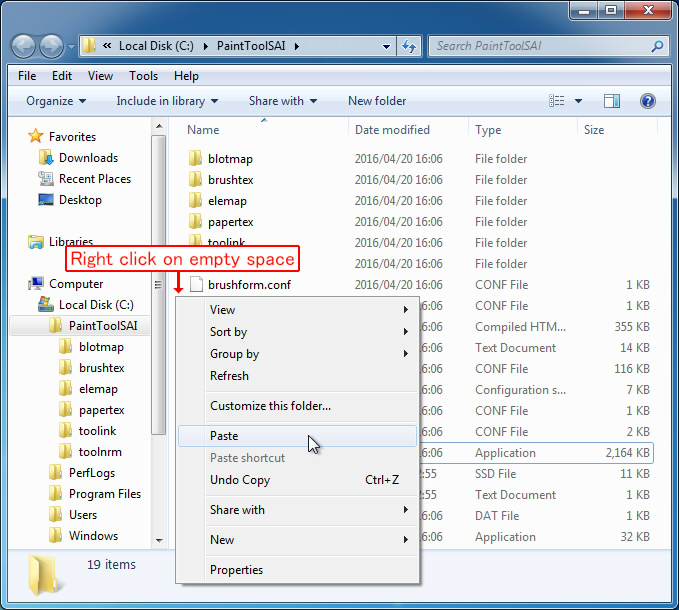
Step 5: Put your software license certificate into SAI's program folder.
I. Show the folder that opened in step 3, and cut or copy your software license certificate to clipboard.
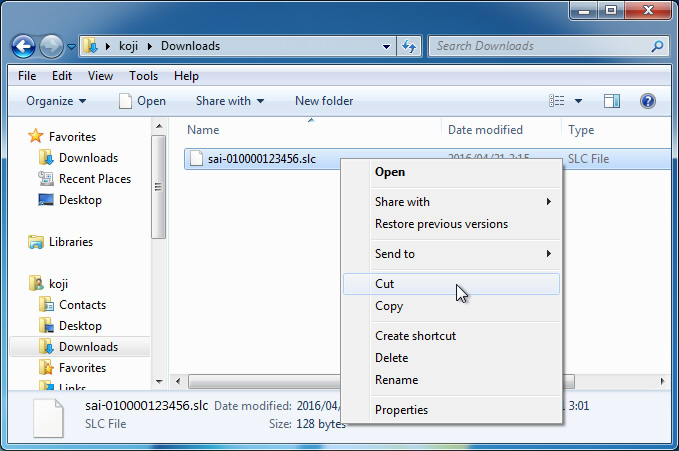 Notice: You NEED NOT OPEN your software license certificate. Please DO NOT OPEN your software license certificate by any program.
II. Paste your software license certificate into SAI's program folder from clipboard.
III. Make sure to your software license certificate is in SAI's program folder.
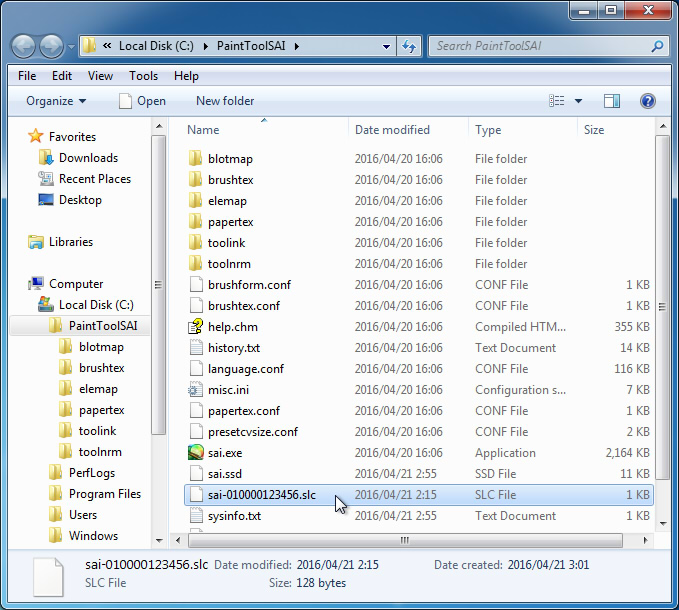 Notice 1:
SAI cannot recognize a filename of software license certificate that ordinal added by web browser.
Please remove it if ordinal is added to your software license certificate.
(e.g. "sai-010000123456 (1).slc" -> "sai-010000123456.slc")
Notice 2:
In default settings of Windows, Windows will hide the extension(".slc") of your software license certificate if you associated SLC file to any program. (In this case, Windows displays your software license certificate as "sai-010000123456" not "sai-010000123456.slc".)
Final step: Confirm the installation of your software license certificate.
Notice: SAI detects a software license certificate only when application starting. If SAI is already running, once close SAI before this step.
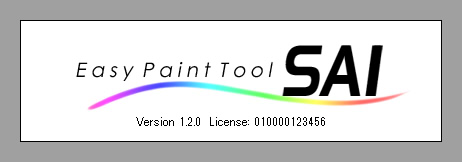
Launch SAI and select menu "Others" -> "Version Info", confirm your license number is displayed like below.
If your SAI shows your license number in version information, the installation of your software license certificate is completed.
|
If you can not complete the installation of your software license certificate, please refer the following documents in FAQ.
|
This site is designed for Microsoft Edge 79, Firefox 34, Chrome 37, Safari 7, Opera 24,
and requires a display environment of 1024x768 32bit true color or higher.
Please do not use materials on this site without permission.
Contact | About Us
|
|
